

Key takeaways:
- Your rating on Google Maps is the average of every review published on the listing, and it changes with each new review that comes in.
- There is no magic number of reviews that gets you to 5 stars. What matters is having enough volume that the average doesn't hinge on one or two isolated reviews.
- For chains with dozens or hundreds of locations, each listing's rating is a gauge of how that location is doing, and tracking it manually, location by location, is a real challenge.
A store gets a 2-star review on Friday. By Monday, the chain's management team doesn't even know it exists, because they were looking at headquarters' performance, not at the Google Business Profile for that specific address.
Meanwhile, anyone who searched for the business on Google over the weekend saw the rating drop and went to a competitor. That happens because the average is calculated and recalculated with every new review, location by location.
For chains and franchises, the problem multiplies: a falling rating can be confined to a single store and go unnoticed for months, making it stand out more than the positive reviews.
In this article, you'll learn how your Google rating is calculated, what it says about your brand, how many reviews it really takes to hold a 5-star rating steady, and which concrete actions help improve each location's rating without violating Google's policies.
How is your Google star rating calculated?
The rating shown next to a business name in Google Search and on Google Maps is the simple average of all public reviews on that listing, on a scale of 1 to 5 stars. It doesn't matter whether a review is old or recent, or who wrote it: every review carries the same weight.
That explains two behaviors that often confuse people:
- The rating takes a while to reflect a new review: after someone leaves a review, Google can take up to two weeks to update the rating it displays.
- Listings with few reviews have an unstable rating: on a listing with 5 reviews, a single 1-star review weighs enough to drag the whole average down. On a listing with 300 reviews, that same review barely moves the number.
For a multi-location brand, the second point matters more than it seems. A new location with only a handful of reviews will naturally have a rating that reacts more to each individual review, positive or negative, than an established chain.
What does your rating say about your brand, beyond the number?
The rating is the public summary of two things that happened before it: the experience the person had at the location, and how the business responded after the review.
People who look up a business on Google rarely read every review. The rating is the first filter, and it makes an impression before anyone reads a word. That's why you need:
- A consistent experience across locations: a chain with similar ratings on every listing signals consistency. Very different numbers across stores of the same brand raise the obvious question: why is this store worse than the other one?
- Follow-up after the purchase: a middling rating with active replies from the business tends to build more trust than a high rating with no visible replies at all, because it shows there's someone on the other side paying attention.
- Social proof at scale: a 4.8 average from 12 reviews says something different from a 4.6 rating from 800 reviews. The second usually inspires more confidence, because the sample is bigger and the rating is harder to move.
Also read: Local digital presence: what it is and how to build it for multi-location businesses
How many reviews do you need for a 5-star rating on Google?
Technically, a single 5-star review is enough for a listing to show a 5.0 rating, since the math is a simple average. In practice, though, that means nothing for your reputation: a 5.0 rating based on 2 reviews won't survive the first unhappy customer, who can knock the average down to 3.5 or lower in one go.
What actually keeps a rating high over time is volume. The more reviews a listing accumulates, the less any single new review moves it, positive or negative, and the steadier the rating stays.
So the question "how many reviews do I need for 5 stars?" has a more useful answer than a fixed number: enough that the average stops swinging with every individual review.
How do you improve your Google star rating?
Improving a location's Google rating comes down to two things that work together: getting more reviews and responding well to the ones you already have. A few actions can help:
1. Make it easy for customers who are already happy
If you want to know how to get 5 stars on Google, the first thing to check is Google's policies, so you understand how the platform works.
According to Google itself, getting more reviews means cutting down the steps: share a link or a QR code that takes people straight to the review screen, instead of asking them to search for the business on Google and find their own way there.
Also read: How to ask customers for Google reviews
2. Respond to every review, not just the negative ones
A reply to a positive review strengthens the relationship with someone who is already a customer. A well-crafted reply to a negative review, on the other hand, shows people researching the business that there's someone behind that rating paying attention, even when something went wrong.
Also read: How to respond to Google reviews: a guide to best practices
3. Don't take shortcuts
Google treats offering a discount, a freebie, or any other perk in exchange for a review (or for changing a negative one) as fake engagement, and doing so can lead to restrictions on your profile.
4. Embrace a mix of reviews
A profile with nothing but positive reviews tends to look less trustworthy than a listing with a balanced mix of praise and criticism answered transparently. After all, trust comes from a consistent track record, not from the absence of any low rating.
Also read: Local SEO guide: strategies to make your business stand out
Why does each location's rating deserve attention in a chain?
Because, for Google, each listing is rated and ranked independently in local search; there's no "chain rating" that makes up for an underperforming location.
What's easy to track for one location becomes impossible to do manually for a chain with dozens or hundreds of addresses. Each listing has its own rating, its own review volume, and its own response time, and Google doesn't roll any of this up automatically for whoever manages the brand as a whole.
In practice, a store's rating can slide for weeks while unanswered reviews pile up, without anyone on the team noticing, because tracking means opening one listing at a time in Google's dashboard.
That's when centralizing review management for every location in a single dashboard becomes an operational necessity. With all reviews organized chronologically in one place and classified by sentiment, the chain can handle each one promptly.
Also read: How to create a Google Business Profile
How do you centralize a chain's reviews in a single dashboard?
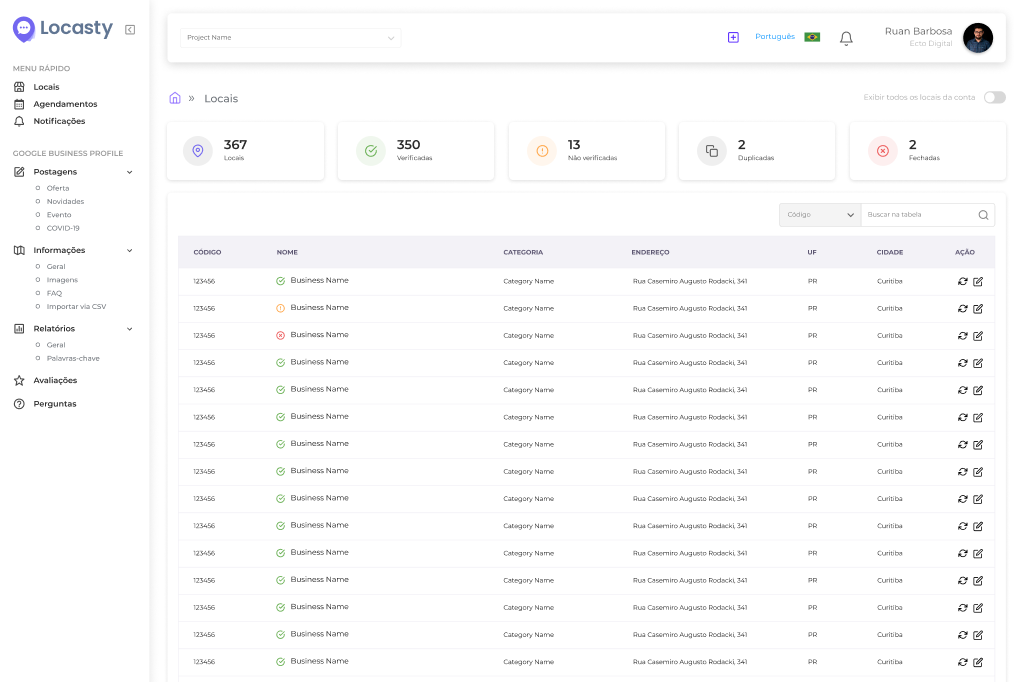
Through an integration with the official Google Business Profile API, a platform like Locasty automatically brings together the rating, review volume, and review history for every address in the chain in a single dashboard.
You and your team can then check reviews for the entire chain in chronological order, with automatic sentiment classification (positive, negative, or neutral), which helps the team see where attention is most urgent without having to read everything.
Locasty also suggests an AI-generated reply that your team can review and adjust before sending, so replies stay on-brand without anyone having to write each one by hand.
You can also compare how the rating evolves address by address and quickly spot where your reputation is slipping before it affects local search. Schedule a Locasty demo and see everything the platform can do.
Also read: Google Business Profile categories: how to choose the right one
Frequently asked questions about getting more stars on Google
A few questions come up again and again about star ratings on Google Maps. Here are answers to the most common ones:
1. Does a star-only review, with no comment, count toward the rating?
Yes. The rating is calculated from the star score of every review, with or without text. The comment helps explain the reason behind the score, but the number itself goes into the calculation even without a single written word.
2. Is the Google Maps rating the same one that shows up in Google Search?
Yes, it's the same rating, calculated from the same set of reviews on the listing. It may look different on Maps and in Search, but each profile has a single number.
Also read: How one location's Google reputation affects your entire franchise network
3. Can you remove a customer review to improve your rating?
Only when it violates Google's policies, such as hate speech, spam, or demonstrably false information. In other words, a review can't be removed just because it's negative or because it hurts your rating.
4. How do you respond to thousands of positive and negative reviews in a personalized way?
Doing it by hand takes more hours than a chain with many locations can realistically spare. A tool like Locasty helps your business:
- organize all reviews in a single dashboard;
- classify each one by sentiment; and
- suggest a personalized, AI-generated reply for the team to review before sending.
These features shorten review response times without losing the human touch each situation calls for.
Want to learn more about our platform? Schedule a Locasty demo and see how to track your whole chain's rating in a single dashboard!
Also read: Google Business Profile photo guide: how to get your images right
Cover image — Source: MH Stock - Magnific.com (2026)



0 comments