

Key takeaways:
- Most people who are happy with a business never leave a Google review. Asking actively, at the right moment and through the right channel, substantially increases the number of reviews you get.
- You can generate a link or QR code that opens the review screen directly (no need for the generic URL from your browser) and use ready-made phrases to make asking easier, whether in person or over WhatsApp or email.
- Offering an incentive in exchange for a review is prohibited by Google and can lead to restrictions on your profile. The right strategy is to keep the process standardized across locations, something Locasty helps you manage from a single dashboard.
______________________________________________________________________________________
Google reviews are often one of the first things people look at before deciding to visit, call, or buy from a local business. They show up right below the business name, next to the average rating, and shape a first impression before any other kind of contact.
Yet for all that reviews matter to businesses, most customers who have a good experience simply never leave a Google review.
But there is a fix: businesses that ask for reviews actively, at the right time and through the right channel, tend to collect far more of them than businesses that wait for reviews to come in on their own.
In this guide, you'll learn why asking for Google reviews matters to your strategy, how to ask in practice (with a ready-to-use link and QR code), which phrases make the ask easier, and how to respond to the reviews you receive.
Why is asking for Google reviews important?
Google reviews directly affect how a business is found and how it's perceived before the first contact. According to Google's own Help Center, how prominently a profile shows up in local results depends, among other factors, on how many reviews the business has and what their average rating is.
In other words, the more positive reviews you have, the better your chances of ranking well when someone searches for a product or service in your area.
That's why building up reviews pays off: it helps you stand out in search. So how do you get more Google reviews consistently? The most effective way is to reduce the effort a person has to make to leave one.
When you simplify the process (a direct link, a QR code, or a ready-made phrase) and ask at the right moment, the response rate tends to go up.
For example, people are most willing to leave a review right after a good experience, such as when a service is completed or a product is delivered.
Also read: How to create a Google Business Profile
How to ask customers for a Google review
Before you ask, you need to have your Google review link or the QR code that takes people straight to your profile's review screen. Here's how to get each one and how to use them day to day:
How to find your Google review link
According to the official Business Profile Help Center, to find your review link you need to:
- Go to your Business Profile.
- Select "Read reviews."
- Then select "Get more reviews."
- From there, you can copy the link directly.
Avoid using the generic URL that shows up in your browser after you search for the business name, since it's usually long and not very user-friendly, and it doesn't take people straight to the review form.
How to create a Google review QR code
In the same menu ("Read reviews" > "Get more reviews"), Google also generates a QR code that matches your review link.
If your business has a physical location, just save the image and put it on a table tent, a counter sticker, your packaging, or anything else customers see during their visit.
How to send your Google review link by WhatsApp, email, or social media
Remember the review link from the previous step? You can also share it over WhatsApp, by email, or even in a social media post, such as on Facebook, as the official Business Profile Help Center recommends.
The best channel depends on the moment: WhatsApp messages work well for asking right after the service, while post-purchase emails are a better fit for products that take a few days to arrive or to be used.
Phrases to ask customers for a Google review
Another way to get Google reviews is to use ready-made phrases. They can make asking feel less awkward for whoever does it and help the request come across as natural rather than forced.
Some examples you can use in person or by message:
- "So glad you enjoyed the [product/service]! If you could leave a Google review about your experience, it would really help other people discover us."
- "We're happy everything went well! Here's the link to review us on Google. It only takes a minute: [link]"
For businesses that send post-purchase emails, these work best:
- "We hope you're enjoying your [product]! Your feedback makes all the difference for people who are still deciding whether to buy from us. Rate your experience on Google: [link]"
- "If you have a minute, we'd love to hear how your experience with us went. Your Google review helps other people find us: [link]"
How to respond to Google reviews
Asking for reviews is only the first step: responding to each one is part of the strategy too. Doing so helps build a closer relationship with the reviewer and positively influences people who are still deciding whether to try your business based on those reviews. Here's how to handle both positive and negative reviews:
Responding to positive reviews
According to Google's Help Center, the person who wrote the review gets a notification when you respond, which strengthens your relationship with existing customers.
It's essential to go beyond a simple thank-you: mentioning something specific from the review (the product purchased, the service they praised, the location they visited) shows the reply isn't a generic template, but a response to what the person actually wrote. Here's a simple example:
- "So glad to hear you enjoyed the service at our downtown location, [Name]! It was a pleasure having you, and we hope to see you again soon."
Positive reviews can be shared directly from Google Maps as testimonials, which helps showcase your products and services to potential customers who are still making up their minds.
Responding to negative reviews
Negative reviews call for more care, because your reply is read both by the person who complained and by anyone who visits the profile afterward. A few basics help here:
- Keep a polite, friendly tone without getting defensive, even when the criticism seems unfair.
- Be concise, since long replies tend to dilute the main message.
- Whenever possible, offer a concrete way to resolve the issue, such as a direct contact channel, instead of just apologizing.
At the end of the day, a negative review that's handled well usually carries less weight than it seems. People reading the reply tend to judge the business more by how it dealt with the problem than by the complaint itself.
Also read: 5 common mistakes when responding to negative reviews
What to avoid when asking for Google reviews
Asking for reviews the right way also means knowing what not to do. Some common mistakes can be costly, from the fallout of a poorly received reply to a restriction imposed by Google itself. Here are the main things to watch out for:
1. Don't offer incentives in exchange for reviews
According to Google's official tips, offering incentives to get more reviews is considered fake engagement and is strictly prohibited.
Giving away products, free services, or discounts in exchange for a review, a rating change, or the removal of a negative review violates Google's policies.
If a business does any of this, it risks having its profile restricted, including a temporary block on new reviews or having its existing ratings unpublished.
2. Don't ask only satisfied customers for reviews
Picking only your happiest customers to ask for reviews, and skipping anyone who had a problem, distorts the business's real rating.
Not only does it misrepresent what the typical customer experienced, but this kind of cherry-picking can also be seen as manipulation, even if it doesn't formally violate Google's policy against fake or incentivized reviews.
3. Don't leave positive reviews unanswered
It's common to think only negative reviews need a response, but ignoring positive ones has a cost too.
When a business never replies to reviews, it can come across as not genuinely engaged with its profile. Responding to positive reviews as well helps keep your review history credible as a whole.
How Locasty helps you ask for and manage reviews at scale
Asking for reviews manually, one listing at a time, works if you manage a single location. When the business has multiple locations, standardizing the ask and keeping up with replies at every one of them becomes hard to sustain on your own.
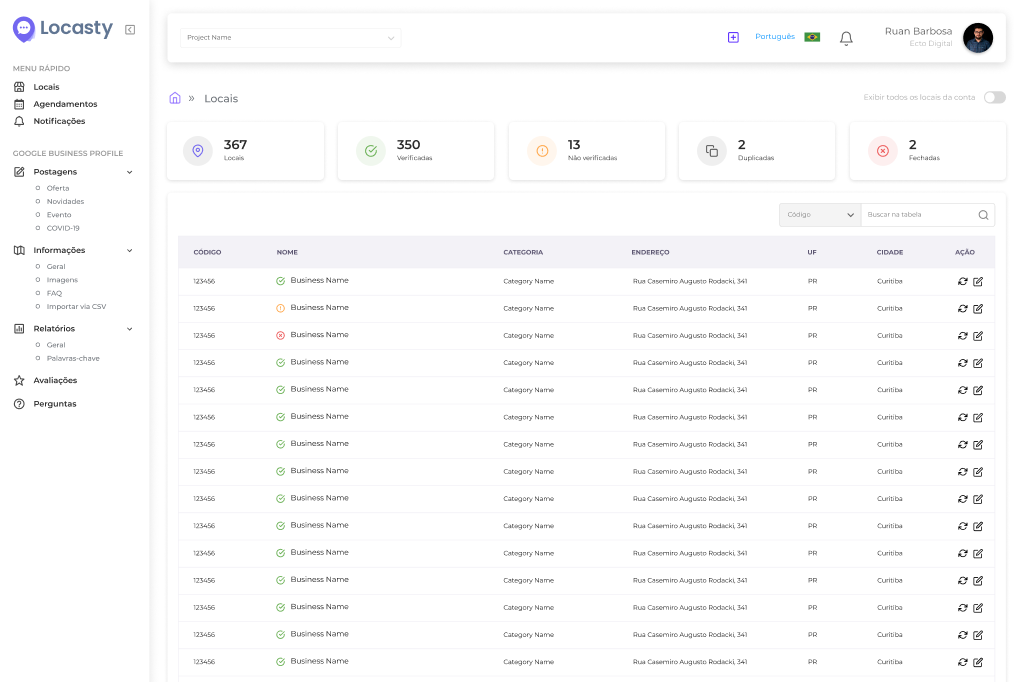
With Locasty, you bring reviews from all your locations into a single dashboard, in chronological order, and get response templates and an AI assistant that help you send faster, more personal replies to every customer.
Get started for free and see in practice how essential Locasty is to your business's success.
Also read: Local SEO guide: strategies to make your business stand out
Cover image — Source: user5391341 / Magnific.com (2026)



0 comments