

Key takeaways:
- Local SEO is the set of techniques that decides whether your business shows up before or after the competition when someone searches Google for what you offer.
- In local search, the buying decision usually happens within minutes, right on the search results page. Outdated information, old photos, or unanswered reviews lower your chances of showing up at the top.
- If you run a whole network of locations, keeping every location's Google Business Profile accurate and consistent takes a defined process and a specialized tool, such as Locasty.
______________________________________________________________________________________
If your business has a physical address or serves a specific area, local SEO is what decides whether your store shows up before or after the competition when someone searches Google for the product or service you offer.
In this guide, you'll learn what local SEO is, what its main benefits are, and how to do it, from the basics to advanced tactics, so your business stands out in Google search. Let's get started!
What is local SEO?
Local SEO is a set of search engine optimization techniques focused on improving a business's visibility in local search results.
With a solid local SEO strategy, when someone searches Google for the category or solution a business offers, its profile appears among the top results.
This strategy is essential for businesses that have a physical location or serve a specific area, since the buying decision usually happens within minutes, right on the search results page.
Google Business Profile as the foundation of your strategy
The first step, even before building a website, is making sure the business has a Google Business Profile (formerly known as Google My Business). It tells Google exactly where the business is located, which areas it serves, what it offers, and what its business hours are.
An accurate, complete profile can significantly improve your ranking in Google's local results, so fill it out carefully.
What are the benefits of local SEO?
A good local SEO strategy supports your business's digital presence and helps it show up among Google's top results. Here's how it benefits businesses:
1. More visibility in local results
More people discover your business, which can translate into more visits, inquiries, and sales.
2. A competitive edge
Winning the top spots is one way to keep competitors from outshining you in local results, right when people are deciding where to buy or who to hire.
3. Reaching the right audience
Ranking well on Google is an effective way to win new customers who are already actively looking for what your business offers.
How to do local SEO: the basics, step by step
A few steps help search engines better understand what your business is about, so it can stand out in local results. Here's how to do local SEO:
Complete your Google Business Profile and keep it up to date
If your business already has a profile on Google, add as much information about it as you possibly can.
Also, set a regular schedule to review and update that information, so searchers always see your business's most current details.
Optimize your description with local keywords
In the description field, explain what your business offers clearly and concisely. Include keywords related to your products or services and a reference to your location. For a shoe store, for example, a good description might look like this:
- "XYZ Shoes has the widest selection of sneakers for the whole family. Here you'll find running shoes, men's, women's, and kids' footwear, flip-flops, and foot care accessories! The store is located 10 minutes from downtown Curitiba, and..."
Notice how naturally the text reads: the keywords (running shoes, men's footwear, and so on) fit the sentence and the context. The result is a description that is both optimized and easy to read.
Build your reputation with reviews and local links
Another key strategy for ranking well is building and maintaining a positive reputation. According to Google's own Help Center, a profile's prominence in local results also depends on how many websites link to the business and how many reviews it has.
The more positive reviews and ratings you have, the better your local ranking tends to be. So encourage customers to share their experience at your store.
Also, look for links from other local websites, such as city newspapers, related businesses in your area, and Yellow Pages-style directories that list businesses by area, service category, business hours, and other criteria.
8 advanced local SEO strategies
No local SEO guide would be complete without the advanced techniques. Once the basics are in place, these help your business stand out even more in local search:
1. Choose accurate Google Business Profile categories
When you create your profile, you need to set your business category. If you're not sure which one to choose, a quick search for competitors can help you identify which categories other businesses use: the category appears right below the review summary on each competitor's profile.
You can choose more than one category, but avoid adding lots of categories that aren't directly related to your business. As a general rule, aim for 3 to 5 categories.
2. Local keywords on your website
If your business has a website, include relevant geographic terms. For example, a pizzeria in São Paulo could optimize its homepage title to include the phrase "pizzeria in São Paulo."
Another tip: list the neighborhoods and areas you serve somewhere on your site.
3. Get more reviews and reply to them
Ask customers to leave reviews on your Business Profile. According to Google's official tips for getting more reviews, sharing a link or QR code that leads straight to the review page makes the process much easier.
Once reviews come in, make a point of replying to them and to the questions left on your profile: Google's Help Center notes that helpful, thoughtful replies show that the business cares about its reviewers, and they also signal that the profile is actively managed.
Also read: 5 common mistakes when responding to negative reviews
4. Consistent information (NAP) across platforms
Another effective strategy is keeping your information consistent across your website, social media, Business Profile, and any other directory.
In local SEO, this concept is usually called NAP (Name, Address, and Phone number), and it's worth extending the same consistency to your business hours.
Keeping this information identical across every platform increases search engines' confidence in your business and can improve your local search ranking.
5. Photos of your location
Google lets you add several types of photos to your profile, such as your logo, a cover photo, interior and exterior shots of the store, photos of your team, and other images.
Aim for high-quality photos, shot from angles that clearly show your store and products in an inviting way. Encouraging reviews with photos also helps, since they give other searchers more reason to trust you.
Also read: A guide to Google My Business photos (in Portuguese)
6. Local links
Links from local websites pointing to your business listing help a lot. They can come from local directories, business partners' websites, or news outlets.
High-quality links from relevant websites in your area can significantly improve your visibility in local search.
7. A mobile-friendly website
If your business has its own website, pay extra attention to the mobile version. A responsive site (one that adapts its layout to any screen size), with easy-to-read fonts and fast load times, is essential for reaching the top of search results.
8. Structured data
You can also optimize your site's source code with structured data markup, such as the LocalBusiness type: standardized code that makes it easier for search engine crawlers to understand the information on your site.
Implementing structured data requires technical knowledge of the language your site is built in, but for WordPress sites, the most popular SEO plugins already include this kind of code: you just turn it on in the plugin's settings and fill in the required fields.
Remember: local SEO is a strategy you build over time. It can take a while to see results, but with persistence, your business can stand out online.
How does Locasty help you manage local SEO at scale?
Even for a single location, these strategies take constant attention. When a business has multiple locations, keeping every listing consistent (descriptions, categories, reviews, photos, and contact details) becomes an operational challenge, not just a strategic one.
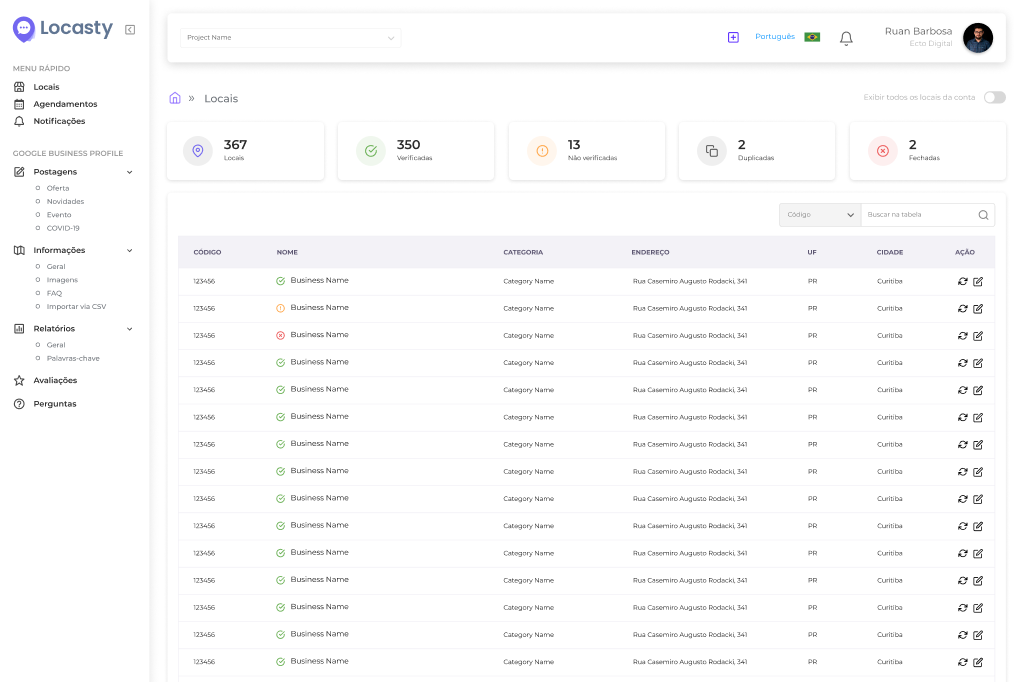
With Locasty, you can quickly manage Business Profile information for all your locations: update content, schedule posts, make bulk edits, and standardize details like name, address, phone number, and business hours across every location, without repeating the process one listing at a time.
You can also track your key local SEO metrics in a consolidated view and manage reviews easily, all from a single dashboard.
Get started for free and see what Locasty can do for your chain!
Also read: How to create a Google Business Profile
Cover image — Source: user12592530 / Magnific.com (2026)



0 comments