

Key takeaways:
- Local SEO for pharmacies is the set of optimizations that determines which location in your chain shows up when someone searches for a nearby pharmacy on Google Maps.
- Google's algorithm weighs relevance, distance, and prominence to decide who appears first in local search. Complete, up-to-date profiles with answered reviews have the edge.
- For chains with multiple locations, keeping every Business Profile up to standard at the same time takes a centralized process. A single outdated location loses visibility no matter how well the others perform.
__________________________________________________________________________________________________
When someone searches for "pharmacy near me" on Google Maps, the algorithm decides in seconds which businesses will appear and in what order. That decision factors in the quality of each pharmacy's profile.
Accurate hours, a precise category, recent photos, answered reviews, and consistent information: each of these factors influences whether a location shows up at all, and for whom.
For pharmacy chains with dozens or hundreds of addresses, the challenge is even bigger. Figuring out how to drive more sales at your pharmacies also means making sure every location's Google Business Profile is standardized, up to date, and ready to appear in local search.
Keep reading to learn what local SEO for pharmacies is, which factors affect each location's ranking on Google Maps, and how to manage all of it at scale.
What is local SEO for pharmacies?
Local SEO for pharmacies is the set of optimizations that improves a location's chances of ranking at the top of Google when someone searches for a nearby pharmacy or a pharmacy service in their area.
Unlike traditional SEO, which focuses on organic rankings for informational searches, local SEO focuses on Google Maps results and the list of businesses that appears for searches with local intent such as "pharmacy open now," "24-hour pharmacy near me," or "drugstore delivery."
For pharmacy chains, local SEO has an extra layer of complexity: each location has its own Google profile, its own review history, and its own set of information that the algorithm evaluates independently.
Also read: How to create a Google Business Profile
How does Google decide who shows up first?
According to Google's official guidelines, local results are determined mainly by three factors: relevance, distance, and prominence. Here's a closer look at each one:
- Relevance: how well the location's profile matches what the person is searching for. The right category, listed services, and a description with relevant keywords make the profile a better match for the right searches.
- Distance: how far the location is from the person searching. This is the only factor your team can't control directly, but you can offset it with the brand's relevance.
- Prominence: how much the location stands out from the competition based on information available across the web, such as review volume, average rating, how often the profile is updated, presence in other directories, and recent activity.
For pharmacy chains, local prominence depends heavily on consistency across locations. A neglected profile can put a store at a disadvantage against smaller competitors that are more active on Google.
What else affects pharmacy rankings on Google Maps?
For chains that want to understand how to drive more pharmacy sales, ranking well on Google Maps is an important part of the strategy. After all, many purchase decisions start with a local search.
But to reach the top positions on Google, a profile has to meet several requirements that the algorithm evaluates continuously.
Some of these signals are easy to fix, while others require a process and consistent work over time. Here are some of the main ranking factors:
1. Is the Google Business Profile complete?
The first thing Google looks at is how complete the profile is. For pharmacies, that includes:
- the right category ("Pharmacy" or "Drug store," not generic categories);
- additional categories, when applicable;
- business hours broken down by day;
- special hours for holidays;
- an up-to-date phone number;
- a website link, if there is one;
- a business description;
- listed services;
- other industry-specific details.
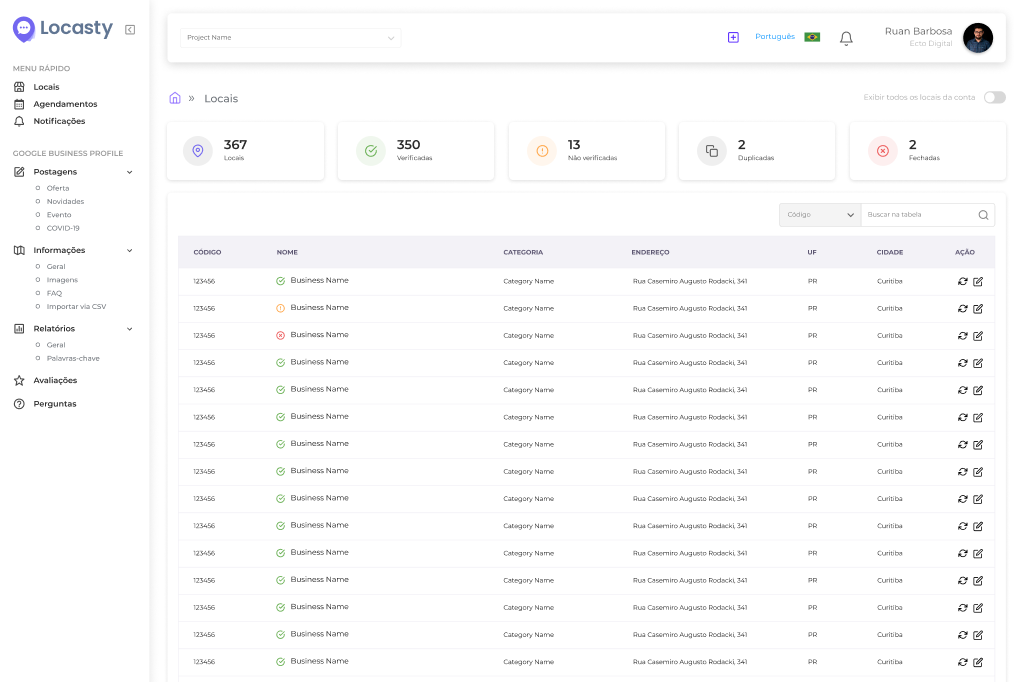
When a pharmacy chain has many locations, the best way to make sure all of this information is filled in correctly is to review it systematically with a local SEO platform like Locasty.
2. Are reviews being answered?
Review volume, average rating, and response rate directly influence the prominence component of the local algorithm. Unanswered reviews, for example, hurt both the listing's ranking and how searchers perceive it.
For pharmacy chains, the challenge is keeping up with reviews across dozens of locations at once without letting unanswered reviews pile up.
It's worth stressing that a location with unanswered negative reviews hurts not just that profile, but how searchers perceive the entire brand.
Also read: How to ask customers for Google reviews
3. Is information up to date at every location?
Changed hours, an old phone number, an outdated address after a store moves, and so on. Every inconsistency directly affects the experience of anyone looking for a pharmacy.
That's because Google cross-checks profile information against other sources available on the web. When it finds inconsistencies, it trusts that listing less and stops recommending the brand in search results.
4. Is the profile active?
Profiles that don't get updates, new photos, posts, or review replies gradually slip in the rankings. Google reads that inactivity as a sign that the business may not be operating normally.
To fix this, publish one post a week on the Business Profile, whether it's a product offer, a health tip, or news about a service. That keeps the listing active.
But for chains with many locations, doing this across every profile at the same time, with relevant content that stays on brand, requires a tool and a process of your own.
The challenge for pharmacy chains with multiple locations
For independent pharmacies with one or two locations, keeping a Google Business Profile up to date is a routine task. For chains with dozens or hundreds of addresses, it's a different challenge.
In practice, every location needs its own profile to verify, fill in, and monitor. For holidays, for example, hours need to be updated on every listing ahead of time. And any operational change, whether it's a renovation, a new address, or staffing changes, needs to show up on Google.
Without a centralized process, at least one location always falls behind. And the problem is that when someone finds wrong information, they simply buy from a competitor instead.
Frequently asked questions about local SEO for pharmacies
Below are answers to the most common questions from people who manage pharmacy chains and want to improve their locations' rankings on Google Maps:
1. Does every pharmacy in my chain need its own Google Business Profile?
Yes. Every physical address needs its own Google Business Profile. The algorithm evaluates each listing independently, based on the information, reviews, and activity of that specific location.
There's no single profile that represents all locations at once. But with a specialized platform, you can centralize every listing in one dashboard, which makes updates much easier.
2. Does a location with a low Google rating hurt the rest of the chain?
Not directly in the algorithm, since each listing is evaluated independently. But it does hurt how the brand is perceived by people searching and comparing options.
For example, someone who sees a location with a 3.2 rating and unanswered reviews may apply that impression to the whole brand, even if the other pharmacies are well rated.
Also read: 5 common mistakes when responding to negative reviews
3. Can Google change my profile information without my approval?
Yes. Google accepts suggested edits from anyone and can also update profile information based on sources across the web. As a result, details like hours, address, phone number, and category can change without your team noticing.
This openness can also be exploited by bad actors to harm a brand. That's why, for chains with many locations, monitoring every change regularly is a must.
4. How often should I review my locations' profiles?
Set up a monthly review routine for the core information, with extra attention before holidays, new store openings, or any operational change that affects hours or how a location runs.
5. What's the difference between local SEO and paid Google ads for pharmacies?
Local SEO and paid ads both help pharmacies gain visibility on Google, but they work in different ways.
Local SEO improves the pharmacy's organic presence in search and on Google Maps. It depends on factors such as accurate information on the Google Business Profile, reviews, photos, categories, location, relevance, and consistency across locations.
Paid ads, on the other hand, deliver immediate visibility but require ongoing investment. While a campaign is running, the pharmacy can appear in sponsored positions. Once the budget runs out, that exposure drops.
For pharmacy chains, the best approach is to combine both strategies. Ads help accelerate specific campaigns, while local SEO builds a more consistent presence for each location on Google.
To put local SEO for pharmacies into practice, chains with many locations need centralized management and a specialized local SEO solution. With the Locasty platform, your chain can:
- manage its Google Business Profiles from a single dashboard;
- standardize information across locations;
- keep track of reviews; and
- keep every listing organized and up to date.
Want to learn more about Locasty? Schedule a Locasty demo and see how easy it can be to simplify your brand's local digital presence!
Also read: Google Business Profile photo guide: how to get your images right


0 comments